
Homepage > Documents > Music Toolkit - Film Cue Tempo Tool Support this website? >>
BPM Calculator for Fixed Tempo Film and Video Game Music Cues
Film Music Tempo Calculation Tool - Version 3.1
 In a movie scene specify the Event Hit Points in the table pull-down menus. Then press the Find best tempo fit button to calculate the best tempo [BPM] and beat fit (the matching error). Modify the Tempo Search Parameters in the top panel. This tool is designed for film and game music composers. Donations from happy users are welcome (follow the Support this website? link at the top).
[More user guidelines >>]
In a movie scene specify the Event Hit Points in the table pull-down menus. Then press the Find best tempo fit button to calculate the best tempo [BPM] and beat fit (the matching error). Modify the Tempo Search Parameters in the top panel. This tool is designed for film and game music composers. Donations from happy users are welcome (follow the Support this website? link at the top).
[More user guidelines >>]
Watch the YouTube 'FMTC User Guide' and the
'User Demo Movies' >>
Use this page in landscape mode on mobile devices.
| Event Markers in Cue - Hit Points | Best tempo fit | 2nd best tempo | 3rd best tempo | Time | ||||||
| Time [hh:mm:ss:dd] | Bt | 4/4 M|B |
Err [s] |
Bt | 4/4 M|B |
Err [s] |
Bt | 4/4 M|B |
Err [s] |
trel [s] |
| Tempo values [BPM]: | Et: | Et: | Et: | |||||||
Guidelines for the user
This JavaScript GUI provides a musical tempo calculator that best fits a number of event markers on a film cue timeline. Musical beats and timing errors are shown in the table cells. Use this GUI as follows:
-
 Select the Tempo Search Parameters. Choose the Tempo range and step size in BPM from the pull-down menus. Tick the radio button for either SMPTE time code [hh:mm:ss:dd] or frames [hh:mm:ss:ff]. This will modify the cue hit point pull-down menus in the table accordingly. Time code will enable 50 ms time steps, choose between 24, 25 or 30 FPS rates. Finally, tick a Meter (time signature) radio button setting.
 - Specify the timing of cue event hit points in the first column pull-down menus. The first hit point determines the initial time offset. Press the Find best tempo fit button and see the results. The three best matching tempo values are shown on the table bottom row (three coloured cells).
- Tempo range limits and step size are specified as metronome markings in beats-per-minute (BPM) units. With many closely spaced events the solution will yield unlikely high tempos. Use tempo search limits appropriate for the film scene mood. At small tempo steps, such as 0.1 BPM, the three best tempo solutions may lie close together. Increase the tempo step size to obtain significantly different solutions.
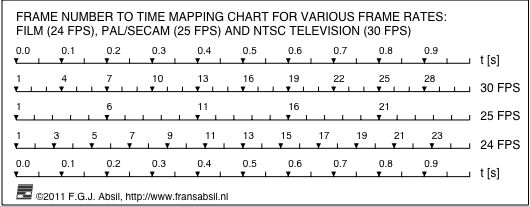
- For SMPTE time code hit points are specified as hh:mm:ss:dd (hours minutes, seconds and hundredths of seconds). The time resolution is 50 milliseconds; i.e., the maximum timing error between movie event and musical beat is 25 milliseconds (i.e., accurate to 1-2 frames). For comparison with film or television frame numbers, see the Frame number to time mapping chart >>
- Pressing the Find best tempo fit button starts the search over the tempo domain, finding the best match between musical beats and the event markers. The three best solutions are shown as the corresponding beat numbers in columns 2, 5 and 8, labeled Bt. The beats for each event are also shown as measure/beat pairs M|B in columns 3, 6 and 9 for the selected meter N/4 (N between 2 and 8, default is 4/4 time signature). For example, assume a hit point at t=5 s. At tempo 120 BPM this event falls on the 11th beat. This corresponds to the M|B numbers 3|3 (the 3rd beat in measure 3) in 4/4 meter and 4|2 (2nd beat in measure 4) in 3/4 meter. The last column, labeled trel, shows the relative timing of the hit point in seconds [s] (accurate to 2 decimals).
- The absolute value of the timing error for each event is shown in [s] (see columns 4, 7 and 10, labeled Err). The overall error that was used for ranking the tempo solutions is shown in the bottom row, as is the resulting tempo in [BPM]. The overall timing error is the Root-Mean-Square Error (RMSE) value ERMS (see the table cells with label Et).
- Pressing the Reset event list and tempo search parameters button will restore the default settings in the timing event series (00:00:00:00) and tempo search domain.
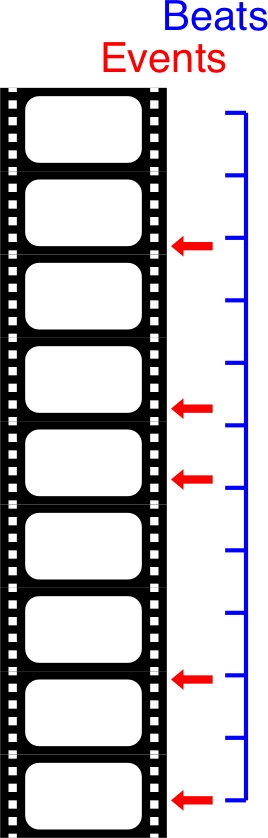
- The use of this GUI is appropriate when a fixed musical tempo must cover hit points in a film cue. The event markers are irregularly spaced on the timeline (shown as red arrows in the diagram on the right). The musical tempo will yield regularly spaced beats (blue line with tickmarks), that should coincide with important events in the scene. The Tempo Tool handles up to 10 events (the first determines the starting point time offset). There will a warning when the fixed tempo cue length exceeds 10 minutes (uncommon in film music). Longer music cues use free timing (accelerando, fermata, etc) to guarantee the coincidence between the important events in the picture and the soundtrack.
There is a User Guide movie on YouTube: How to use the Film Music Tempo Calculation tool (6:16).
Watch this tool being used by film music composers
This tool is demonstrated by film music composers on YouTube (older and recent versions):
- Sync to Picture, by Daniel James (9:59).
- Composing to Picture, by Richie Blac (4:08).
- It is used by film and game music composers such as Tyler Devon Gillis, Daniel James, Andi Labes, Natalie Papachristou, Brad Sucks, Luis Vallenotti, and Jordain Wallace.
The tempo tool is also discussed in internet forums. Read the MusicTech.Net article by Mark Cousins on creating film music with Logic Pro: Music Tech Logic Tutorial: Producing Music To Picture Part Two - Working With Hit Points (published Nov 19th, 2014). There is a reference to my tool in the article on Finding the Perfect Tempo for a Film Score on the DIY Film Composer Website (published September 4, 2018). See these posts on Cakewalk Forum: Scoring Video (Oct 28, 2016), or V.I.:Control Composition Technique (Jul 2, 2016), or Recording.de Filmmusik (Aug 16, 2015) and (Jun 27, 2013), or Rob Wilson Resources (Jan 1, 2014), or TIGForum Independent Gaming Discussion (Aug 16, 2013), or Overclocked Remix Scoring for Film (Mar 21, 2013), or Ableton Film Music Production Workshop (Jun 19, 2013), or Gearslutz Video and Post Production Forum (Mar 27, 2012), or 10,000 Hour Quest Composing Tidbit (2012), or Pinterest, and Cockos Film Score with Reaper Forum (Jul 21, 2010).
Mapping frame numbers to timing in fractions of a second
For comparing SMPTE time and frame code see the mapping chart below.
Want to use the 'Film Music Tempo Calculator' V3.1 locally?
As a result of updating this tool the current version is receiving an increasing number of hits. In case you would like to purchase and run the Film Music Tempo Calculator tool locally in a browser program on your computer, send an e-mail for more information.
Further reading
The following references discuss the aspects of timing and click tracks for film scoring:
- George Burt, The Art of Film Music. ISBN 1-55553-193-8, Northeastern University Press, Boston, 1994.
- Earle Hagen, Scoring for Films, Updated Edition. ISBN 0-88284-388-5, Alfred Publishing Co., Inc., Los Angeles, 1971.
- Milton Lustig, Music Editing for Motion Pictures. ISBN 0-8038-4729-7, Hastings House Publishers, New York, 1980.
- Roy M. Prendergast, Film Music, A Neglected Art. ISBN 0-393-00862-2, W.W. Norton and Company, New York, 1977.
- Norbert Jürgen Schneider, Komponieren für Film und Fernsehen, Ein Handbuch. Studienbuch Musik ED8708. ISBN 3-7957-8708-4, Schott Musik International, Mainz, 1997.